
One clock for the room
The server holds the room’s position. Play, pause and seek go through it and reach every member at once, so nobody counts down “three, two, one” on a call again.
Between commands, drift is corrected quietly. A player that falls a little behind speeds up by five percent until it is back; a viewer you would never notice it on. Only a player more than three seconds off, after a stalled connection or a sleeping tab, is moved in one jump.
Each browser measures its own round trip to the server and allows for it, so a viewer on the other side of the world is not permanently late by their ping.
- Heartbeat
- Every five seconds, the room’s authoritative position.
- Within 0.5 s
- In sync. Normal speed.
- 0.5 to 3 s off
- Plays at 1.05× or 0.95× until the gap closes.
- Over 3 s off
- Seeks straight to the room’s position.
- Latency
- Measured continuously with ping and pong, half the round trip added to every heartbeat.
- Live streams
- Left to the player’s own live-edge catch-up, never dragged to a position.
Everything a movie night needs
A room is a link. Whoever opens it joins, sees who else is there and what is queued, and the first one in can name the room and choose its settings.
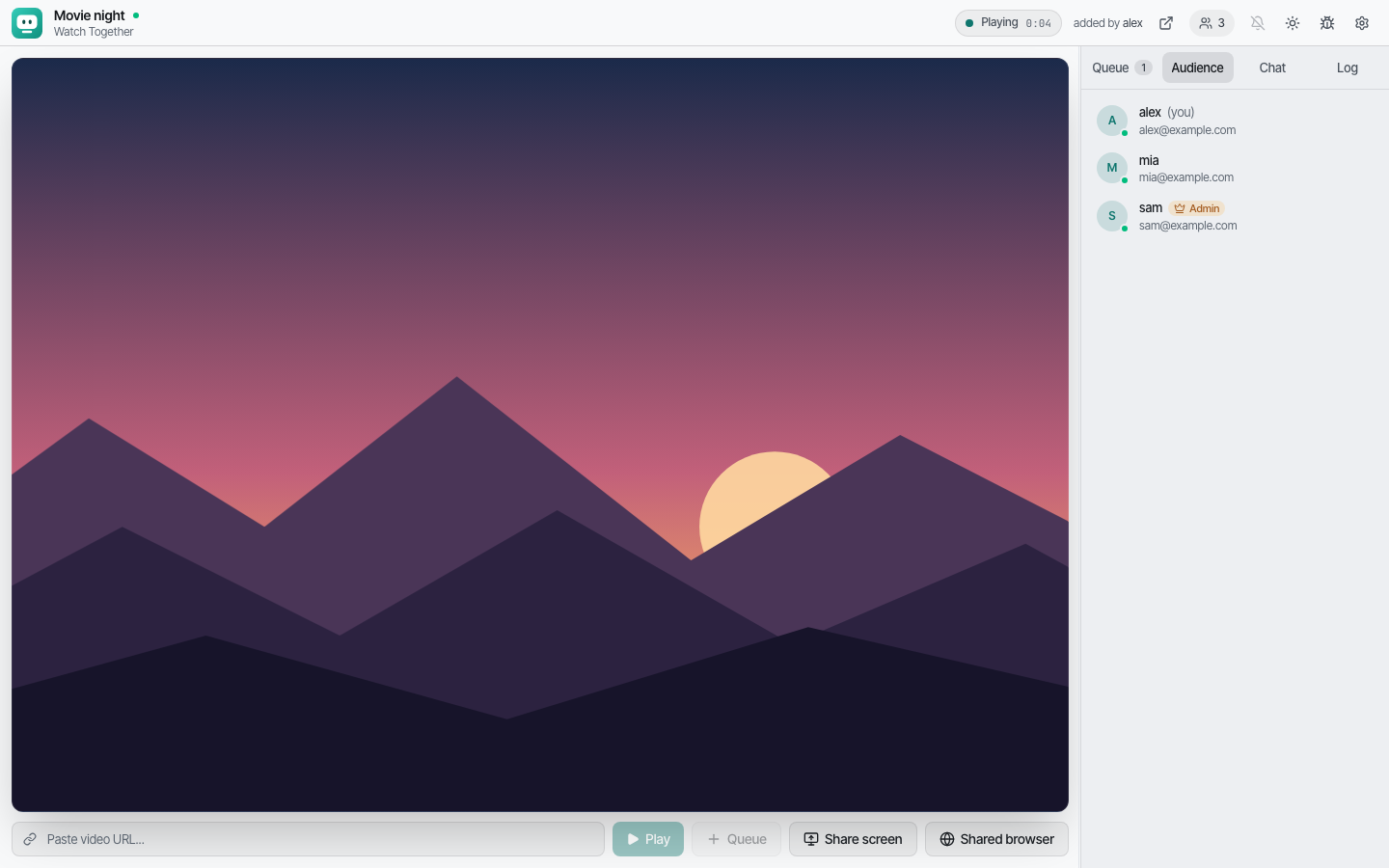
A shared queue
Drag to reorder, see who added what, open the original. A link is queued at once and resolved behind it, so pasting never waits.
SponsorBlock for the room
Sponsor, self-promotion and reminder segments are skipped for everyone at the same moment, by the server. The admin chooses which. Uses SponsorBlock data, licensed under CC BY-NC-SA 4.0.
Live chat beside live streams
Twitch, YouTube, Kick and Owncast chat in a side panel, or any chat embed you point it at.
Share your screen
Show the room your game, with sound. The server relays it, about half a second behind, and someone who joins halfway still gets a picture.
Audio that behaves
One loudness level per video, measured over the whole programme by the server. Night mode for quiet evenings, mono for one earbud.
Seek preview
Hover the timeline to see the frame under the pointer.
A shared browser
Opt in to a real browser on the server that the whole room watches and the admin drives, for anything a link cannot reach.
Yours to theme
Light and dark, six accents and a custom one. Optional upscaling in the browser, on WebGPU where available.
Plays where a site would rather it didn’t
Links are resolved on the server with yt-dlp, which knows more than 1800 sites. YouTube hands out audio and video as separate files with no manifest, so Watch Together writes a real DASH manifest for them and plays both through one video element. One clock in the browser too, so lips match words.
Every byte comes through your server. The first seconds of a video, the next one in the queue and the spot after a sponsor skip are fetched ahead of time, so starts and jumps do not wait on a slow road between continents.
- Paste a linkResolved once for the whole room, starting the moment it is pasted
- ManifestWritten from the files’ own index, up to 4K
- ProxyEvery request validated and pinned to the address it was checked against
- One video elementMedia Source Extensions, picture and sound on one clock
One signed-in member is enough
Many videos only play for a signed-in account, and a server never is. The Watch Together Cookie Sync extension lends your YouTube, Twitch or Kick session to your own instance, so the videos others in your room paste play too.
It is lent, not handed over. Cookies live in the server’s memory, for single videos only, and are gone half an hour after you stop syncing.
Your session, on the server
| Kept in | Process memory only. Never a file, never the database. |
|---|---|
| Gone | 30 minutes after the last sync, when you disconnect, or on restart. |
| Lent to | Members of a room you are in, or left less than 30 minutes ago. |
| Used for | Single videos on YouTube, Twitch and Kick. Never feeds, playlists or channels. |
| Sent back | Never. No response ever contains a cookie value. |
Watch history is off until you switch it on; then the videos you watch land in your own YouTube history, where you stopped.
Run your own
Watch Together is a Docker Compose stack: a FastAPI backend, the Next.js app and nginx in front. Put it behind a Cloudflare Tunnel and Access and only the people you invite get in, verified, with no port opened on your network.
Start it
git clone https://github.com/rennerdo30/watch-together
cd watch-together
cp .env.example .env
docker compose up -d --build
Then open http://localhost. The only setting in .env is the optional tunnel token.
What you are running
browsers ── HTTPS ── Cloudflare Tunnel (optional)
                              │
                            nginx
                  ┌───────────┴───────────┐
       FastAPI: yt-dlp, rooms,      Next.js: the app
manifests, the proxy- One worker, by design: rooms and caches live in its memory.
- DNS for every container over HTTPS.
- Identity from Cloudflare Access, verified on every request.